
Meta-Harness: the Missing Layer Above Claude Code, Codex, and Pi

Different coding agents and agent harnesses have different strengths. Using them together lets you combine those strengths: you can assign different parts of a job to different models and run them in parallel, have one agent check another's work, or give lower-complexity tasks to less expensive or more token-efficient harnesses.
But using multiple agent harnesses together isn't always easy (if it's possible at all). You may find yourself writing one-off scripts to let the agents work together, or manually copying context from one agent UI to another. Each agent harness has its own approach to cost controls, sandboxing, permissions, and sharing, so you need to learn how multiple different systems work.
You should not have to manually coordinate work across several agent interfaces to combine the strengths of different agent harnesses. Omnigent is a meta-harness that sits above the coding harnesses you already use, such as Claude Code, Codex, Pi, OpenCode, and Hermes Agent, and provides an orchestration, collaboration, and policy layer across all of them. It is driven by declarative configuration and gives you a single interface for working with agents and sharing sessions. In other words, Omnigent lets you use the strengths of each agent harness while handling many of the challenges for you.
In the rest of this post, we'll see how Polly, a multi-agent orchestrator built into Omnigent, handles that coordination on a small coding task.
Opening one of Polly's subagent sessions in Omnigent.
Polly orchestrates a bug fix with Claude Code, Codex, and Pi
I wrote a small client to pull a GitHub repository's open issues and group them
by label to help with issue triage. On a personal project with only a small
handful of issues, it worked great, quickly listing the outstanding issues and
top labels. I decided to try it out against the
Omnigent repo, though, and it only
returned 30 issues. At the time of writing this article, the Omnigent repo had
well over 250 open issues. Furthermore, the two labels at the top of the output,
size/XL and needs-demo, are both pull request labels. (You might guess at
this point—correctly—that I'm not super familiar with the GitHub API!)
$ python -m ghlite.digest omnigent-ai/omnigent
Open issues in omnigent-ai/omnigent: 30
Top labels:
   10  size/XL
    9  needs-demo
    9  triaged
    7  size/M
    7  Bug
    5  size/S
    4  size/L
    3  help wanted
    3  P2-medium
    2  enhancement
Fixing this would require reviewing the client code and getting a better understanding of the GitHub API, then making and reviewing several separate changes. This is a good fit for a multi-agent system: one agent can examine the client while another checks the API, and the resulting fixes and reviews can be planned and assigned in sequence or in parallel as needed.
Omnigent includes a built-in agent configuration called Polly for coordinating that work. Polly decomposes goals into tasks and dispatches subagents to complete them. Each task gets its own agent harness and git worktree. The subagent sessions remain visible in Omnigent, so you can open one at any time to see what the subagent is doing, ask questions about its part of the work, or redirect it.
The whole session, including the orchestrator and the subagents, is governed by
a blast_radius
orchestration policy
that blocks irreversible commands such as force pushes while allowing routine
reads, edits, tests, and local git operations to proceed without prompting.
Multi-agent investigation
I handed the client repository to Polly and invoked Polly's /investigate skill
to find out why my triage client broke when used on a larger repo. It dispatched
two subagents on different harnesses, one to read my code and the other to query
the GitHub API.
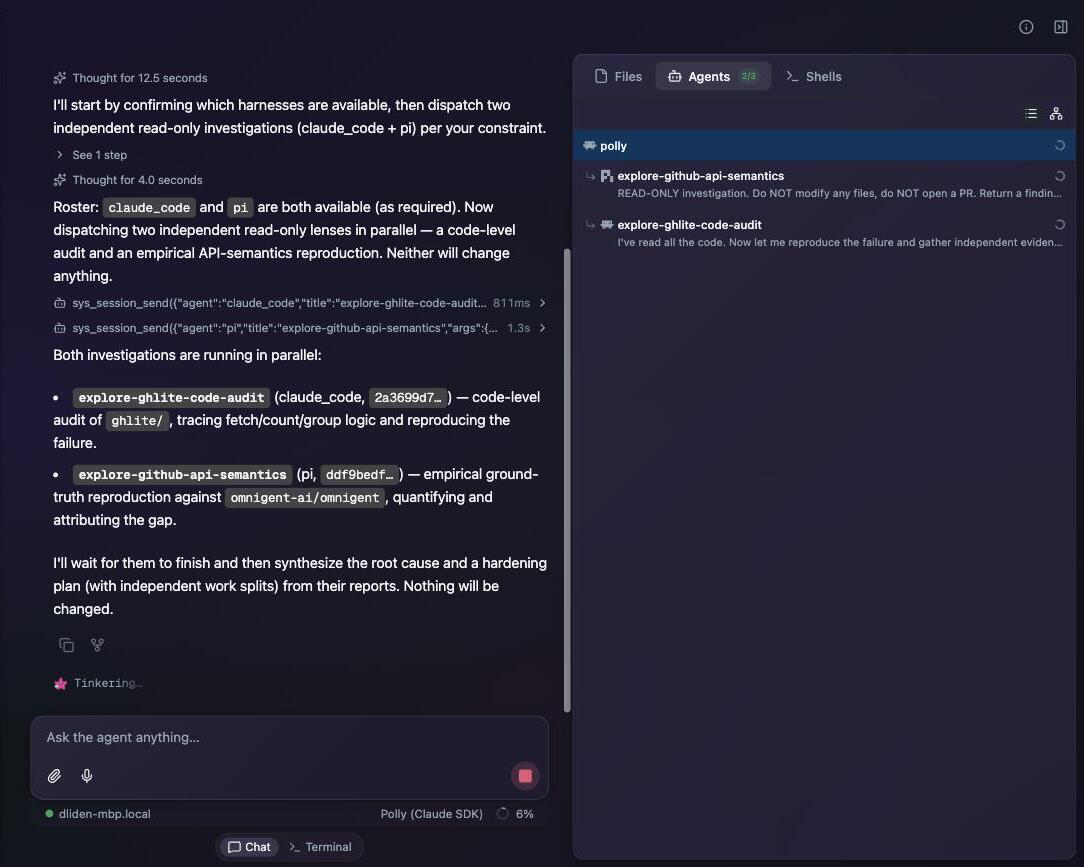
Polly runs the investigation read-only, across two different harnesses.
The investigation found that the repo actually had 294 open issues, not 30. My
client made a single API request and parsed the results, but the GitHub API
returns results one page at a time (30 by default) and points to the next page
with a Link: rel="next". So the naive implementation read the first page and
stopped. This was easy to miss when testing the client on a small repository
with only a handful of issues!
The issues endpoint also returns pull requests alongside issues unless you
filter them out, which is where the size/XL and needs-demo labels were coming
from. The investigation also found that the client had no retry logic and no
handling for GitHub's rate limits. These issues didn't show up when testing on a
small example repo, but both could break the client on a larger, more active
project.
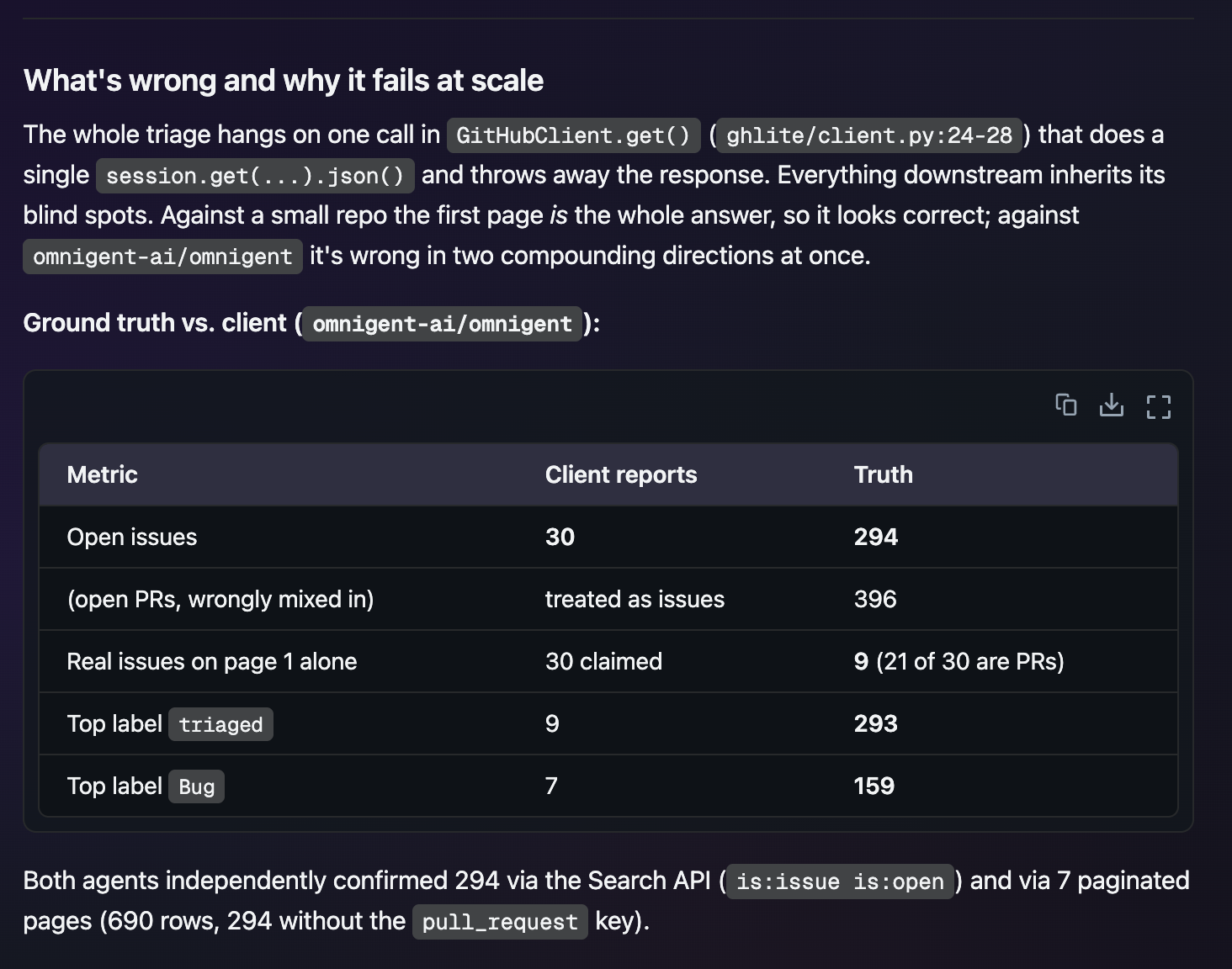
Polly traced the incorrect count to a single unpaginated request. Its two investigation subagents independently confirmed that the repository had 294 open issues.
After the investigation, I instructed Polly to focus on three main fixes:
- Pagination: follow the
Link: rel="next"header and fetch every page. - Filter out pull requests so the counts and labels reflect issues only.
- Retry and rate-limit handling for failed requests and GitHub's limits.
Different agents review each other's work
Once I gave it the go-ahead to start coding, Polly loaded its /fanout skill to
run the series of fixes. It started with the pagination fix, since the other two
changes depended on it. Polly handed that change to Claude Code, which wrote the
pagination code and its tests, got them passing, and opened a PR.
After the pagination change was written, reviewed, and fixed, Polly handed the
other two changes out in parallel, one to a Codex subagent and one to a Claude
Code subagent, each in its own git worktree to avoid collisions. It stacked
those two PRs on the pagination branch rather than on main, so each one showed
only its own diff. After each change finished, Polly sent its diff to another
agent for review. The reviewer and implementer ran on different agent harnesses,
so the reviewer was less likely to share the implementer's blind spots.
| Fix | Implemented by | Reviewed by | Review outcome |
|---|---|---|---|
| Pagination | Claude Code | Codex | one issue found → fixed |
| Filter out PRs | Codex | Pi | passed |
| Retry & rate limits | Claude Code | Codex | one issue found → fixed |
I ended up with three PRs, each reviewed by a different agent from the one that
implemented it. Two of the three reviews caught issues that needed to be
resolved. On the pagination change, the reviewer noticed it could loop forever
on a cyclic next link, with no guard to stop it. On the resilience change, the
reviewer noticed it handled only the numeric form of GitHub's Retry-After
header and ignored the HTTP-date form, so it could wait less than the server
asked. The two changes went back to their implementers, who fixed the issues and
added tests.
All of this work happened in Omnigent. I did not need to navigate between different harness-specific UIs; I never copied and pasted code or other context; and harness-specific permission and approval systems never interfered with the work.
Try it yourself
Omnigent is a meta-harness: a shared orchestration, collaboration, and policy layer that sits above the agent harnesses you already use. One of the easiest ways to try it is with Polly, a built-in multi-harness coding orchestrator that uses the coding harnesses already installed on your system to split up a coding job, run independent tasks in parallel, and send each change to a different agent for review.
Install Omnigent with
curl -fsSL https://omnigent.ai/install.sh | sh, then run omni setup to
configure your agent credentials. From your project directory, start Polly with
omni polly. Give it a bug to investigate or a coding task to split up, then
open the subagent sessions and follow their work.